How Effective Is Your SIEM, Really? A Four-Pillar Scoring Framework to Find Out
I Built a KPI Framework to Actually Measure SIEM Effectiveness — Here’s How It Works
I’ve been building, tuning, and troubleshooting SIEM platforms since 2012 — started with ArcSight, went deep into LogRhythm, and more recently Sentinel and Defender XDR. Across all these platforms and multiple SOC environments, one question keeps coming up in every management review meeting:
“How effective is our SIEM?”
And the answers I used to hear — from myself included early in my career — were always along the lines of “we have 400 rules in the AI Engine,” “our Data Processor is handling 15,000 MPS,” “we reduced our MTTR by 20%.” Sounds impressive on a slide. But none of that actually tells you whether your SIEM can detect a real attack when it happens.
I got fed up with vague answers, so I built a framework that boils SIEM effectiveness down to four scores — hard percentages that tell you exactly where you stand and what to fix next.
Let me walk you through the whole thing.
The Problem with How We Usually Measure SIEM
Here’s a scenario I’ve seen too many times. An organization has LogRhythm deployed — Platform Manager, Data Processor, Data Indexer, AI Engine, the full stack. 300+ AI Engine rules, System Monitor Agents deployed across servers, log sources pulling data from all over the place. On paper, everything looks great. Then you dig a little deeper and realize:
- Windows Server logs are flowing into the Data Processor, sure — but only authentication events. No process creation (4688), no Kerberos ticket requests (4768/4769), no service installation (7045). You’re basically blind to half the kill chain.
- The firewall is integrated and traffic logs are coming in, but system logs are completely absent — no configuration change events, no administrator authentication activity, no HA failover alerts. If someone modifies a firewall rule or an admin account gets compromised on the firewall itself, your SOC has no visibility.
- There are 12 AI Engine rules tagged for “Lateral Movement” but nobody has ever tested whether they actually fire when someone runs PsExec across the network.
- The WAF isn’t connected at all. Nobody even raised it during the last connector review.
I ran into exactly this situation during a recent engagement. The client was confident about their SIEM maturity. They had good reason to be — they’d invested heavily in SIEM, had a dedicated SOC team, SmartResponse playbooks(SOAR) configured, the works. But when I started peeling back the layers, the picture was very different from what the dashboards showed.
That experience is what pushed me to formalize this framework.
The Four Pillars
I think about SIEM effectiveness as four questions that build on each other:
- Are we collecting logs from all the critical devices and security controls that exist in our environment? (Coverage)
- Are the logs we’re receiving rich enough and detailed enough to actually support threat detection? (Quality)
- Based on the log sources we have, do we have sufficient SIEM rules and correlation logic to detect the attacks that actually matter? (Detection Coverage)
- When we simulate real attack scenarios, do those detections actually trigger — or are they just sitting there looking good on paper? (Detection Confidence)
Miss any one of these and you have a blind spot. Let me break each one down.
Pillar 1: Log Source Coverage Score
This one seems obvious but you’d be surprised how often it’s not done properly. The question is simple — out of every device, application, and security control in your environment, what percentage is actually sending logs into SIEM through a configured log source?
I start by going through the asset inventory (or CMDB if you have a decent one — big if, I know). List out every technology category: identity systems like Active Directory, endpoint security like your EDR and AV, network security devices like firewalls and proxies and IDS/IPS, cloud infrastructure, email security, PAM, DLP, vulnerability scanners, the lot. Then mark each one — should it be in LogRhythm? Is there an actual log source configured and receiving data in the System Monitor or Open Collector?
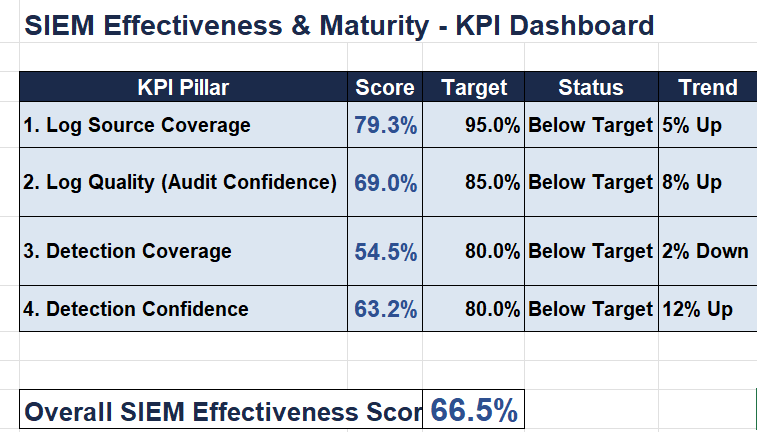
In one assessment I did recently, I counted 29 log sources that should have been feeding into SIEM(LogRhythm). 23 were actually integrated with proper MPE policies parsing the data. That’s a 79.3% coverage score.
The six gaps? WAF logs (they had an F5 ASM but never bothered setting up syslog forwarding to LogRhythm), SQL Server database audit logs (the DBA team “was going to get to it” — I’ve heard that one at least a dozen times), DHCP server logs, Kubernetes container logs, a custom ERP application, and physical badge access. Now, missing badge access logs is low priority. But missing WAF and database audit? That means web application attacks and data exfiltration from databases are essentially invisible to your SOC analysts sitting in the Web Console.
Target: 95% or higher.
One thing I always do — assign criticality to each source. Missing a Critical source like AD Domain Controller logs is not the same thing as missing badge access. When you present to management, lead with the score but always follow up with “here are the Critical and High gaps that need immediate attention.”
The other thing worth checking — just because a log source exists in SIEM doesn’t mean it’s healthy. I’ve seen log sources that were configured months ago but silently stopped sending data because of a various reason. Part of measuring coverage is verifying that each source is actively receiving logs, not just that it exists in the deployment.
Pillar 2: Log Quality / Audit Confidence Score
This is the pillar I’m most passionate about because it catches the sneakiest problem in SIEM operations. Your Coverage Score might say “Windows Servers — Integrated, check!” But what exactly is SIEM collecting and parsing?
I can’t tell you how many environments I’ve walked into where Windows Security Event Logs are flowing through the Data Processor, MPE is parsing them fine, and everyone’s happy about it — but when you look at the actual log data it’s just Event ID 4624 (logon success) and 4625 (logon failure). That’s it. No 4688 process creation with command line auditing. No 4768/4769 Kerberos TGT and TGS requests. No 7045 service installations.
Without 4688 and command line data, you cannot detect PowerShell abuse, LOLBin execution like Bitsadmin or Certutil misuse, or fileless malware through process creation monitoring. Without Kerberos logging, Kerberoasting and Golden Ticket attacks are completely invisible — your SIEM rule for “Abnormal TGS Requests” is sitting there with zero data to evaluate. Without 7045, an attacker installing a malicious service for persistence goes unnoticed.
The log source is “covered” per Pillar 1. But the quality of what’s being collected is garbage for actual detection work.
How I score it: For each log source, I define the expected audit categories and assign weights based on how important they are for detection. A source that’s collecting everything it should gets 100%. A source that’s only collecting basic authentication events might score 40-50%.
“For Windows Servers, I don’t assign weights randomly — the rating directly reflects how many detection use cases in the rule engine have a dependency on that event type. 4688 with command line scores the highest at 20 points because the largest number of rules rely on it: process creation is the backbone of detecting PowerShell abuse, LOLBin execution, fileless malware, and more. Kerberos events (4768/4769) get 15 because without them, every credential theft use case — Kerberoasting, Golden Ticket, AS-REP roasting — goes blind. The logic is simple: if more use cases break when an event is missing, that event carries more weight.”
Then the source quality is simply what’s present versus what should be present, weighted accordingly. The overall audit confidence is the average across all your major log sources.
In the assessment I mentioned, Windows Servers scored 55% — because the high-value events were exactly the ones missing. The Palo Alto firewall scored 80% — traffic and threat logs were flowing, URL filtering was there, but system logs were completely absent. No configuration change events, no admin authentication logs, no HA state-change alerts. If someone modified an ACL or a NAT rule outside of change management, or if a compromised admin credential was used to log into the firewall management interface, the SOC would have zero visibility. Azure AD scored 75% (managed identity and provisioning logs missing). Linux servers scored 65% — no auditd execve rules deployed. I’ve managed large Linux fleets before, 500+ Ubuntu servers, and I know firsthand that deploying auditd rules at scale via Ansible is very doable, but it’s just not on most teams’ radar until someone asks for it. Office 365 scored 65% (DLP policy matches and Power Platform activity absent).
Overall Audit Confidence: 69% against a target of 85%.
Target: 85% or higher.
Here’s what I love about this pillar — the fixes are almost always configuration changes, not procurement requests. Enabling 4688 with command line? One GPO change. ScriptBlock logging for PowerShell? Another GPO. Auditd execve on Linux? Push an Ansible playbook. Enabling firewall system logs and admin authentication logging? A syslog profile update on the Palo Alto to send the required logs.
Pillar 3: Detection Coverage Score
Now we get into the detection layer. The question here: based on the log sources we have integrated into LogRhythm and the threats relevant to our environment, do we have sufficient AI Engine rules and correlation logic to detect real-world attack techniques?
I’m a firm believer that every AI Engine rule should map to a MITRE ATT&CK technique. If it doesn’t, I want to know why it exists. “Suspicious Activity” as a rule name with no technique mapping is a red flag that tells me nobody thought through what this rule is actually supposed to catch.
The way I calculate this — I look at what our log source portfolio allows us to detect based on MITRE ATT&CK, determine the minimum number of use cases we should have for each tactic, and then compare that against what’s actually configured in the AI Engine. The expected use case count is driven by what your data allows you to detect, not by some arbitrary industry benchmark.
In the assessment, I mapped all 12 MITRE tactics and came up with 119 required use cases based on the available log sources. 77 were actually implemented as AI Engine rules with proper correlation logic. Detection Coverage: 64.7%.
Where did the gaps cluster? Same place they always do in my experience:
- Discovery (50%) — account enumeration, network share discovery, trust relationship mapping. Attackers do this right after gaining initial access. They’re running
net user /domain,nltest /dclist:, querying AD for service accounts — and most SOCs have barely any AI Engine rules to catch it. - Lateral Movement (60%) — RDP, PsExec, WMI, SMB-based movement. This is the middle of the kill chain and it’s often the biggest blind spot. You can build solid LogRhythm rules here using log correlations between authentication events and process creation across different hosts, but it takes effort.
- Defense Evasion (57%) — obfuscation, indicator removal, process injection. Hard to detect but critical.
- Exfiltration (50%) — data leaving over alternative protocols, staged data, transfer size thresholds. LogRhythm’s DI can help here if you’re correlating network metadata with endpoint activity, but most deployments don’t go that deep.
What this tells you is that the organization was decent at catching the beginning (phishing, initial access at 75%) and the end (ransomware/impact at 83%), but had a massive gap in the middle. An attacker who gets past the initial phishing detection has a lot of room to operate — enumerate the environment, steal credentials, move laterally — before hitting a tripwire.
Target: 80% or higher.
Pillar 4: Detection Confidence Score
This is where it gets real. You have the AI Engine rules — but do they actually fire when the attack happens?
I’ve seen rules that look perfect in the AI Engine policy editor but have never triggered in production because of a threshold misconfiguration, a missing metadata field in the parsed log, or an MPE regex that doesn’t quite match the log format after a device firmware update. Detection Confidence separates rules that exist from rules that actually work.
This pillar has two components.
Use Case Simulation
Run actual attack simulations against your LogRhythm deployment. I use a mix of Atomic Red Team, manual techniques, and sometimes Caldera depending on the environment. For each use case, execute the simulated attack technique and check — did the AI Engine rule fire? Did an alarm appear in the Web Console or SIEM Console?
Out of 15 use cases I simulated, 10 triggered and 5 failed. Simulation Pass Rate: 66.7%.
The five failures told a story:
- Kerberoasting didn’t trigger — because 4769 logging wasn’t enabled on the Domain Controllers. The AI Engine rule was sitting there waiting for TGS requests with RC4 encryption, but the events never arrived at the Data Processor. Classic Pillar 2 problem bleeding into Pillar 4.
- PowerShell Empire C2 missed — ScriptBlock logging not configured. The rule was looking for encoded command patterns and suspicious script content, but without ScriptBlock events there’s nothing to evaluate.
- DLL Side-Loading — the EDR policy needed tuning for the specific technique. The log data was there but the MPE policy wasn’t parsing the relevant fields correctly.
- Malicious Service Install — Event ID 7045 wasn’t being forwarded to LogRhythm. The Windows agent was configured to collect Security log but not System log where 7045 lives. One checkbox in the System Monitor Agent configuration.
- OAuth Consent Phishing — app consent audit logging had a gap in the Azure AD connector. This one I’ve spent a lot of time on — the OAuth consent flow is a real attack vector and I’ve done deep investigation work on multi-tenant app registration attacks. The logging for it is often incomplete even when you think you’ve got Azure AD covered.
Three out of five failures traced directly back to log quality gaps. This is why I say the pillars build on each other — you can write the most elegant AI Engine rule for Kerberoasting detection, but if 4769 events aren’t flowing through your Data Processor, that rule is just taking up space in the rule database.
APT Group Benchmarking
This is the part that gets management’s attention. Pick APT groups relevant to your industry and geography. For each one, pull their documented TTPs from MITRE ATT&CK, figure out which ones apply to your environment, check how many you have AI Engine rules for, and simulate.
For APT29 (Cozy Bear) — very relevant for government and technology sectors — there are roughly 120 documented techniques. 85 were applicable to this particular environment. Of those, 40 had corresponding AI Engine rules in LogRhythm. After simulation, 28 triggered. APT29 Confidence: 70%.
When you sit in front of a CISO and say “we can detect 70% of APT29’s applicable techniques in our SIEM”
Target: 80% or higher.
Putting It All Together: The Overall Score
I use a weighted average because not all pillars carry equal importance:
- Coverage: 30% weight (you can’t detect what you can’t see)
- Log Quality: 25% (garbage in, garbage out — doesn’t matter how good your AI Engine rules are)
- Detection Coverage: 25% (you need the rules and correlation logic)
- Detection Confidence: 20% (validation is the ultimate proof)
For this assessment, the weighted score came out to approximately 69.8% overall SIEM effectiveness.
That number, on a slide, with a target of 85% next to it, and a remediation roadmap below it showing how you get from 69.8% to 78% in 60 days — that’s a conversation management understands. No ambiguity, no hand-waving.
The Remediation Angle
Every score maps directly to actions with predictable impact. That’s what makes this framework useful beyond just measurement.
Quick wins (1-2 weeks): Enable 4688 command line auditing via GPO. Enable ScriptBlock logging. Push auditd execve rules via Ansible. Configure firewall system log and admin authentication forwarding to LogRhythm. Update the System Monitor Agent config to collect Windows System log (for 7045). These are all config changes — no procurement, no budget approvals needed. They move the Quality Score from 69% to roughly 80% and immediately improve Detection Confidence because previously broken AI Engine rules start getting the data they need.
Medium-term (1-2 months): Integrate the missing critical log sources — WAF, SQL Server, Kubernetes. Set up proper log source types and MPE policies in LogRhythm for each. Build out the lateral movement and discovery AI Engine rules. Run a full simulation cycle to validate everything end to end.
Strategic (quarter-long): Monthly Atomic Red Team simulation runs automated where possible. Expand APT benchmarking to cover all threat groups relevant to your industry. Build a continuous feedback loop — every new log source or audit policy change triggers a re-score of all four pillars.
How I Track This
I built an Excel workbook with separate sheets for each pillar, auto-calculated scores, a remediation tracker with owners and timelines, and a methodology reference. The dummy data in the template mirrors the realistic numbers I’ve described here. Swap out the log source inventory, audit checks, and MITRE mappings with your environment specifics and you’ve got a management-ready KPI dashboard.
I present this quarterly. The trend line is what matters most — if Q2 was 65% and Q3 is 72%, I can point to exactly what drove the improvement: “we integrated SQL Server audit logs (+2% coverage), enabled 4688 command line auditing (+8% quality), built 10 new AI Engine rules (+4% detection coverage), and validated 20 rules via simulation (+5% confidence).” Everything traces back to specific work that specific people did.
Final Thoughts
After 14+ years in this space, I’ve come to believe that the biggest gap in most SOC operations isn’t technology — it’s measurement. We’re good at deploying tools, writing AI Engine rules, tuning MPE policies, and responding to alarms. We’re terrible at measuring whether all of that actually works against the threats we care about.
This four-pillar framework isn’t perfect, and I’m still refining it with every engagement. But it’s changed the way I approach SIEM maturity assessments and — more importantly — it’s changed the conversations I have with leadership. When you can put a number on “how confident are we that our LogRhythm deployment would detect APT29,” you’re operating at a completely different level than “we have lots of rules and our MPS looks healthy.”
If you want to try this in your own environment, here’s the Excel template I use — swap the dummy data with your actuals and you’ve got a management-ready KPI dashboard.